3. Leapfrog
Note
Preview feature. The Leapfrog Hospital Survey cover is shipping in preview while the cover layout and the six-domain evidence index are validated against the 2026 Leapfrog Hospital Survey Hand Hygiene Standard. The companion Leapfrog dashboard widgets and the Leapfrog Hand Hygiene Standard report are not themselves in preview.
clearPath supports the Leapfrog Hospital Survey Hand Hygiene Standard end-to-end. The Leapfrog tools are split between three places in the product:
The Leapfrog cover page documented below bundles the data the Hospital Survey expects into a single printable view.
Account-level observation targets and
Complete/Gapthresholds live on the Leapfrog tab of the Account editor, with matching per-unit overrides on the Unit editor.The Leapfrog Hand Hygiene Standard report and the Leapfrog dashboard widgets surface the same data on the dashboard and in scheduled reports.
To open the cover page, go to Transparency and Standards | Leapfrog in the sidebar.
3.1. Hospital Survey Cover
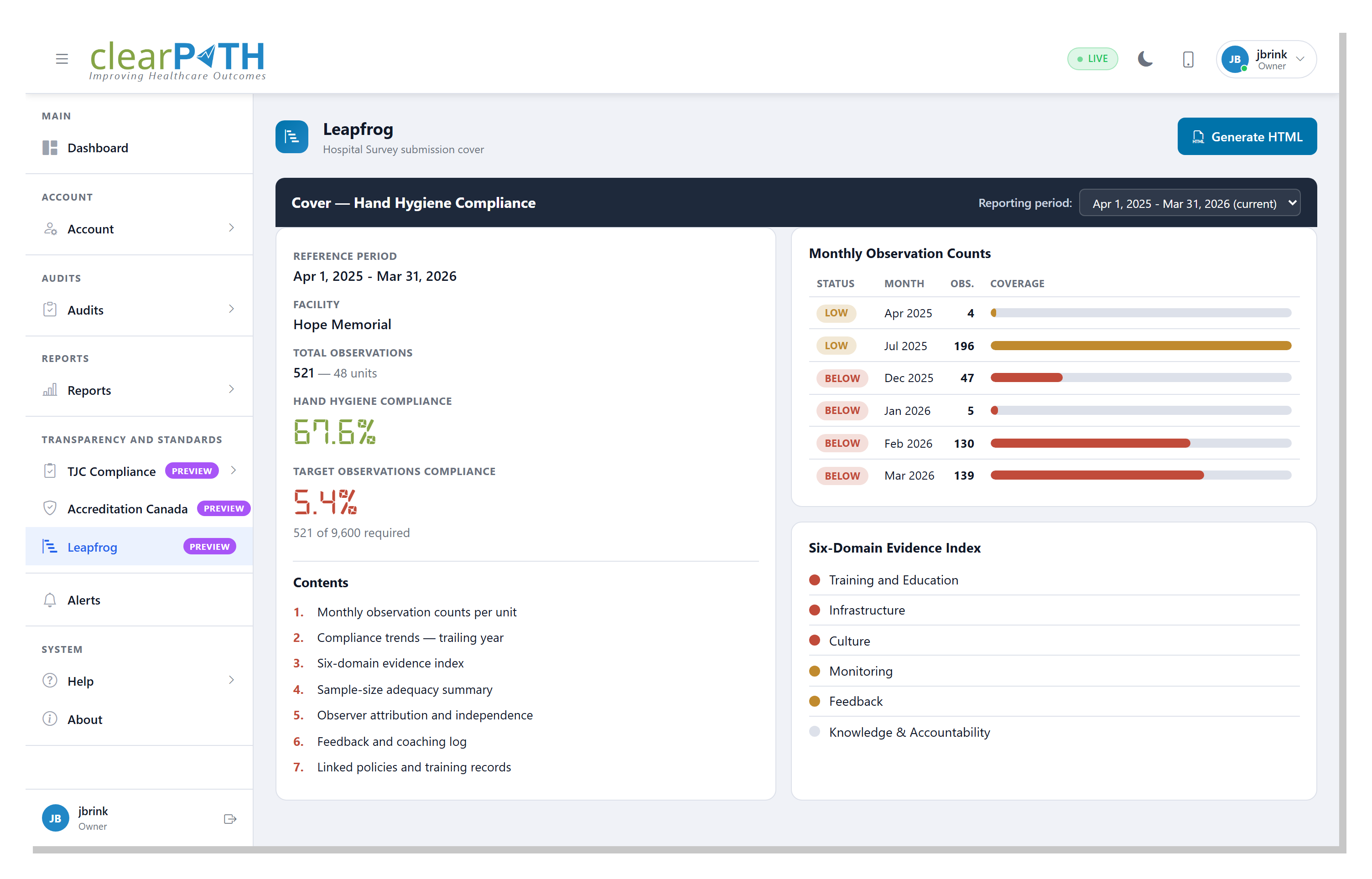
The Leapfrog cover page is a single printable view of the data the Hospital Survey asks for under the Hand Hygiene Standard. The page combines the headline compliance numbers, the monthly observation counts per unit, and the six-domain evidence index that surveyors review.
3.1.1. Page Header Actions
Generate HTML— opens a printable version of the cover ready to save as PDF through the browser print dialog.
3.1.2. Reporting Period
The reporting period selector at the top of the cover banner sets the window every card on the page is calculated against. Pick the period your facility’s Hospital Survey submission covers.
3.1.3. Cover Summary
The left card lists the cover-sheet fields a Leapfrog reviewer reads first.
Reference Period— the reporting window currently selected.Facility— the facility being reported on.Total Observations— the total number of hand-hygiene observations recorded across the facility’s units in the reference period.Hand Hygiene Compliance— the overall compliance percentage for the period.Target Observations Compliance— the percentage of the facility’s observation target that has been met for the period.
Below the summary is a Contents block linking to the four
companion dashboard pages that supply the supporting evidence for
each of the seven Hospital Survey questions:
Monthly observation counts per unit.
Compliance trends for the trailing year.
Six-domain evidence index.
Sample-size adequacy summary.
Observer attribution and independence.
Feedback and coaching log.
Linked policies and training records.
3.1.4. Monthly Observation Counts
The right card breaks the totals down month-by-month. Each row shows
the month, the observation count for that month, the per-unit
coverage, and a status indicator: Complete, Gap, or
Missing — determined by the thresholds set on the
Leapfrog tab of the Account editor.
3.1.5. Six-Domain Evidence Index
The Hospital Survey assesses six evidence domains as part of the
Hand Hygiene Standard: Training and Education,
Infrastructure, Culture, Monitoring, Feedback, and
Knowledge & Accountability. Each domain is shown with a coloured
dot indicating whether clearPath holds enough evidence to support
that domain in the current reporting period.
3.2. Domain Evidence Dashboard
The six evidence domains also have a dedicated dashboard page that shows, domain by domain, exactly which pieces of evidence clearPath holds and which are still outstanding. It is the place to go when a surveyor asks “what supports this domain?”
To open it, go to Dashboard | Leapfrog | Domain Evidence in the sidebar.

TODO screenshot: the Domain Evidence dashboard showing the six domain cards, each with a status dot and an evidence checklist.
Use the Facility and Unit selectors at the top to scope the page to
a single facility or unit, or leave them on All Facilities and All
Units for the whole organisation. Click Back to Dashboard in the page
header to return.
The page shows one card per domain — Training & Education, Culture,
Knowledge & Accountability, Infrastructure, Monitoring, and
Feedback. Each card has:
a coloured status dot: green when the domain’s evidence is complete, amber when there is a gap, and red when the required evidence is missing;
a summary line reading, for example,
4 of 5 evidence artefacts linked(theMonitoringcard instead shows the number of observations recorded over the trailing year);a checklist of the individual pieces of evidence the domain expects, with anything still outstanding marked
— missing;a footer badge summarising the card as
COMPLETEor showing the number of gaps.
3.3. Leapfrog Dashboards
The Domain Evidence page is one of a set of Leapfrog dashboard pages
reached from Dashboard | Leapfrog. Each opens from its
matching dashboard widget and presents the supporting evidence for the
Hospital Survey questions:
Domain Evidence— the six-domain evidence checklist described above.Observation Volume— observations recorded against the Leapfrog minimum, with anExportbutton for the chart.Unit Coverage— how many units meet the observation threshold.Submission Window— a snapshot of volume, coverage, window, and open follow-ups for the annual submission window.Open Follow-ups— outstanding coaching and re-audits.Sample-Size Adequacy— a per-unit table of whether each unit has enough observations.Compliance Trend— the compliance percentage over the reporting period, with anExportbutton.