18. Audit Progress
The Audit Progress page is the live coverage heatmap that pairs with Scheduling. For every active schedule, it shows how many observations have been recorded, how that compares to the target, whether the team is ahead of or behind pace, and who is responsible for the unfilled assignments. Use it day-to-day to spot units at risk of missing their Leapfrog or accreditation target while there is still time to act.
To open Audit Progress, go to Audits | Audit Progress in the sidebar.
18.1. Coverage Heatmap
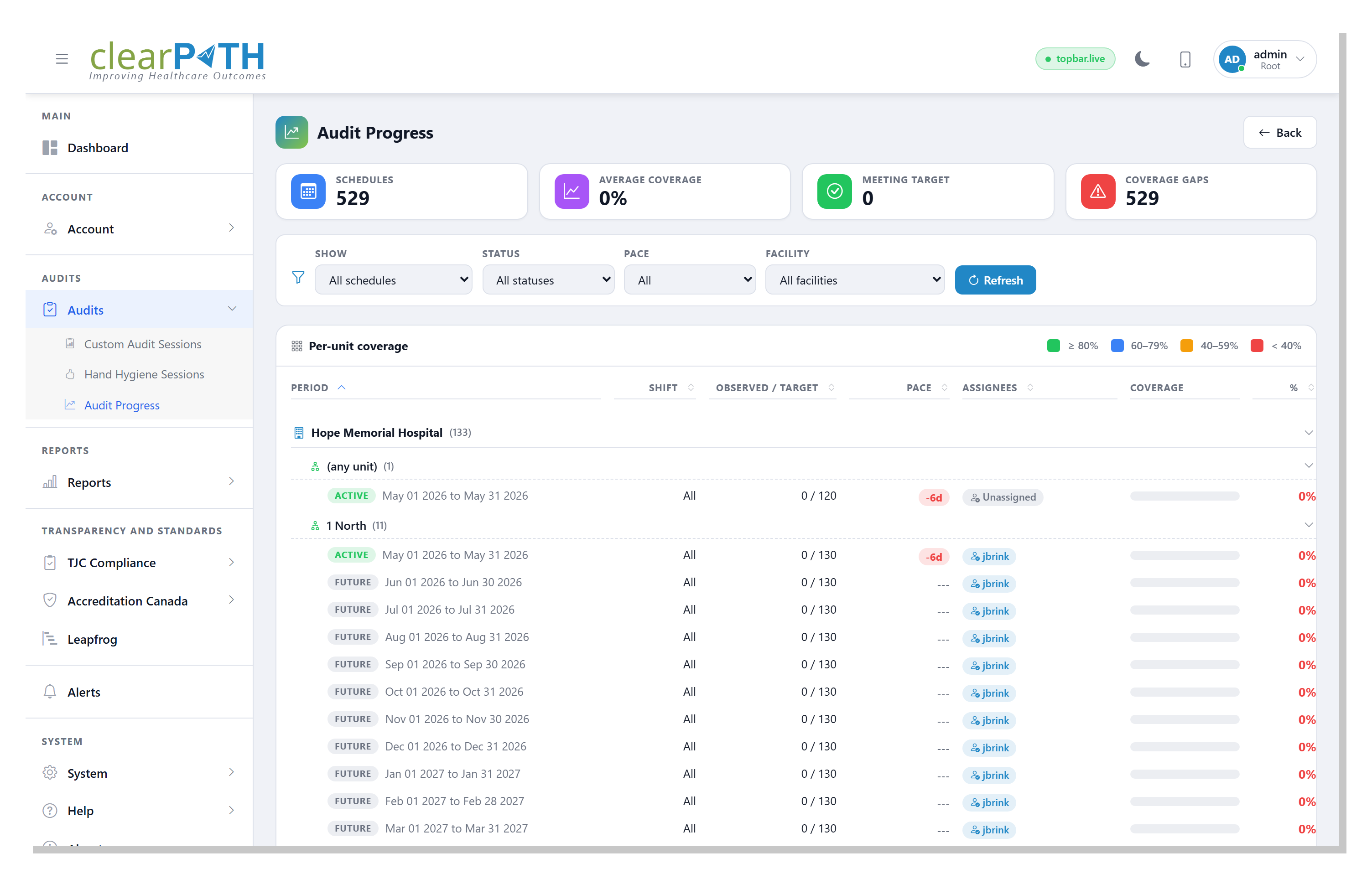
Every schedule appears as a row, grouped by facility and then by unit. A coloured progress bar at the right of each row shows the percentage of the target observations that have been recorded inside the schedule’s date window. The colour follows the standard clearPath coverage bands:
Green — ≥ 80% of target
Blue — 60% to 79%
Orange — 40% to 59%
Red — below 40%
18.1.1. Stat Cards
Cards across the top give you a rollup of the filtered list:
Schedules— the total number of schedules visible with the current filters.Average coverage— the mean coverage percentage across those schedules.Meeting target— the number of schedules whose coverage is ≥ 80%.Coverage gaps— the number of schedules whose coverage is below 60%.
18.1.2. Filtering
Show—All schedulesto see every active schedule, orMy assignments (todo)to scope to only the schedules you are personally on the hook for.Status—All,Active(current period running now),Future(period has not started yet), orPast(period has closed).Pace—All,Ahead, orBehind. A schedule is ahead when more days’ worth of observations have been recorded than days have elapsed in the period; behind is the opposite. Future schedules are excluded from the ahead/behind filters.Facility— scope to a single facility.Refresh— re-run the query.
Your filter selections are remembered between visits to the page.
18.1.3. Row Columns
Each schedule row shows:
A status pill —
Active(current),Future(not yet started), orClosed(period has ended).Period— the start and end dates of the schedule.Shift— the shift the schedule applies to.Observed / Target— observations recorded out of the planned target.Pace— how many days ahead of (+) or behind (-) schedule the team is. Shown as---for future schedules where pace cannot yet be computed.Assignees— a pill showing the auditor responsible for the observations, the count of observers when more than one is assigned, orUnassigned.Coverage— the colour-coded progress bar.%— the coverage percentage as a number.
Click any column header (Period, Shift,
Observed / Target, Pace, Assignees, or %) to sort
the heatmap by that column. Click a second time to reverse the
direction.
18.1.4. Page Header Actions
Back— returns to the previous page.
18.1.5. Grouping and pagination
Click any facility header (with the building icon) or any unit
header to collapse all of its schedules into a single line. Use
the Rows/page selector at the bottom of the card to control
how many schedules render at once when the list is long.